Find your sky
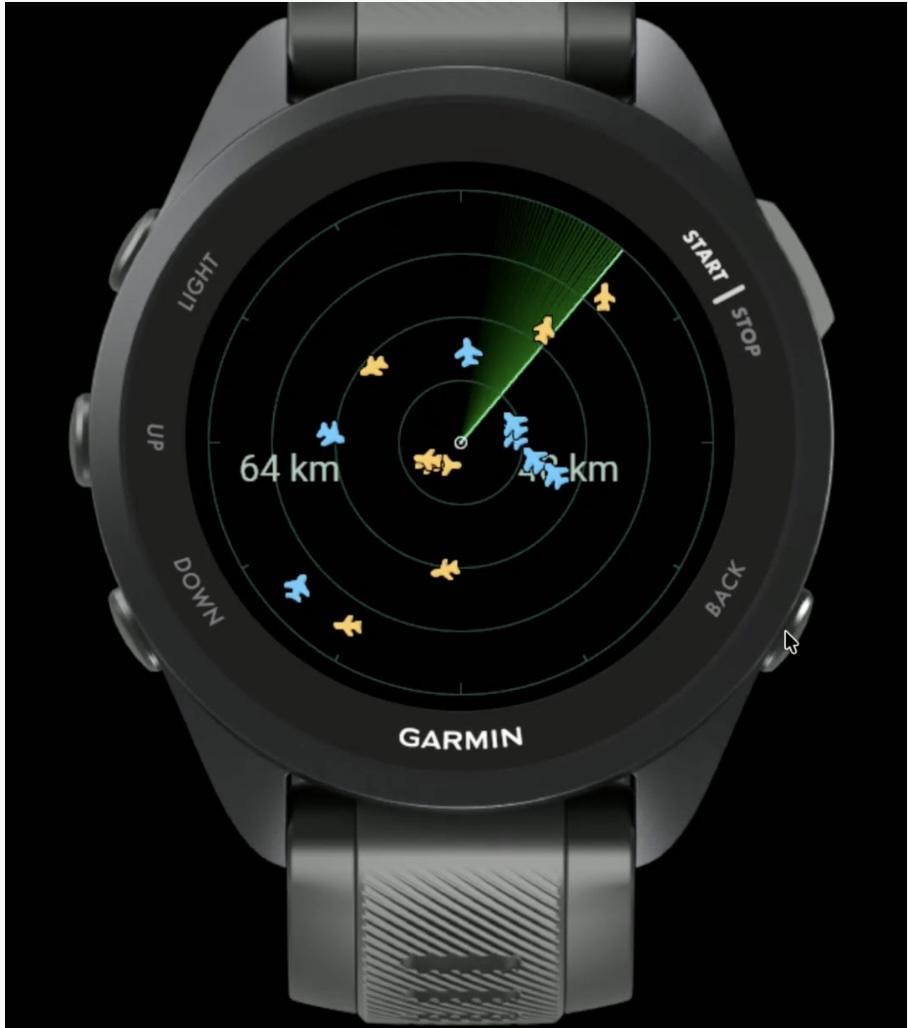
Nearby aircraft on a radar. One glance and you know where to look.
FOR YOUR GARMIN WATCH
That aircraft overhead has a story. Find out what it is, where it is heading and how close it is. All from your wrist.
RADAR · FLIGHT INFORMATION · SIGHTINGS
01 / THE APP
Open the radar, find that aircraft and get the details. Your phone can stay in your pocket.
Nearby aircraft on a radar. One glance and you know where to look.
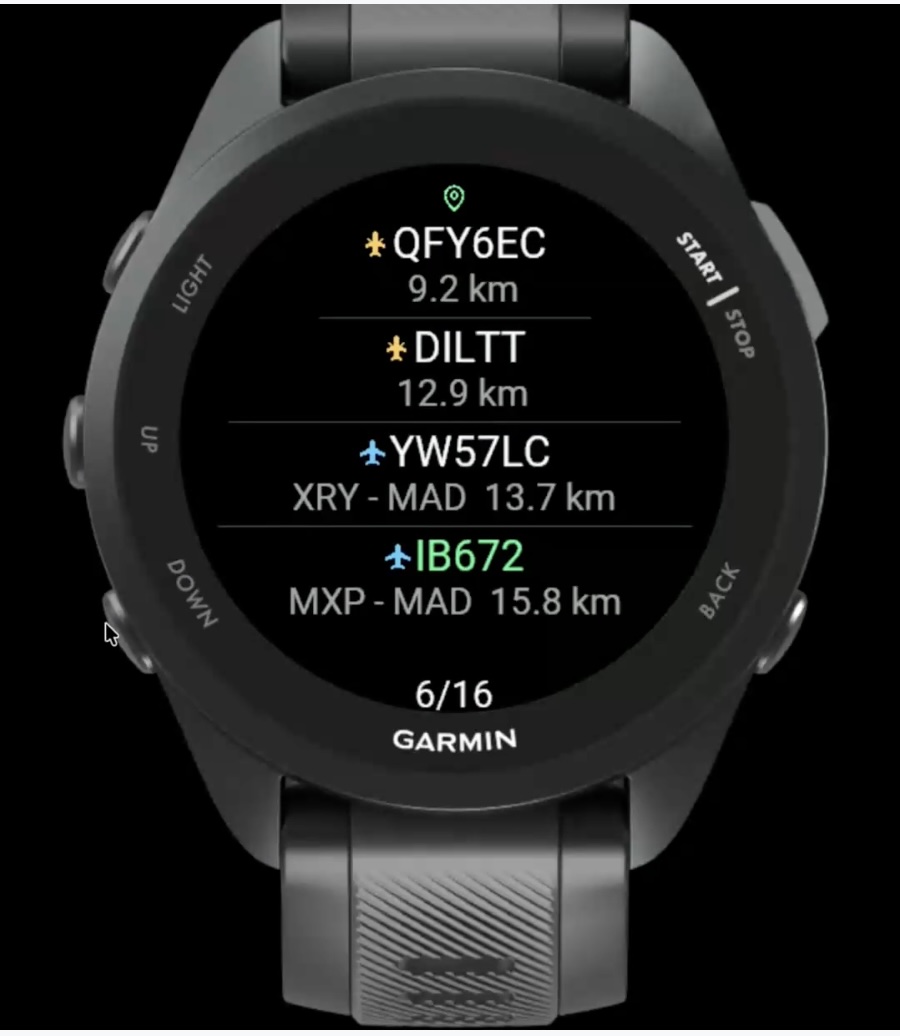
Check its altitude, speed and distance. Discover the route when it is available.
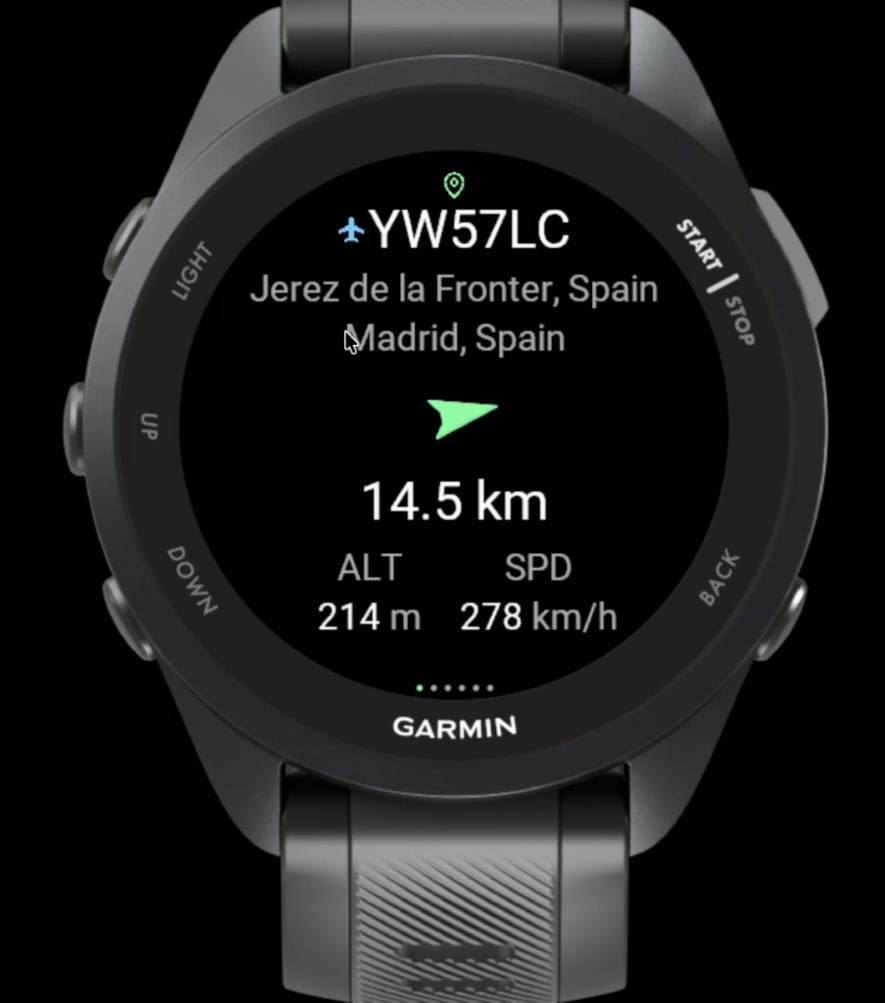
Explore aircraft information and open live tracking on your phone.
02 / THE COMMUNITY · PREVIEW VERSION
Points determine your rank: each sighting earns 1, and confirmed military aircraft earn 1.5. See actual sightings and unique aircraft by type too.
| RANK | EXPLORER | POINTS | UNIQUE AIRCRAFT |
|---|
Loading the leaderboard.
03 / THE RULES
To score, open an aircraft’s detail on your watch. Only that aircraft is validated against your GPS and ADS-B data; leaving the radar open does not record sightings.
Seeing it on the radar or in the list does not score. An aircraft is evaluated when you open its detail and live information loads. It counts only if every rule is met; opening it again on the same day does not add another sighting.
Parked, taxiing and runway aircraft do not score. They count only when ADS-B data indicates they are airborne and they meet the distance limits. Unknown flight state does not score.
Each military sighting confirmed by the API earns 1.5 points; other sightings earn 1 point. GPS, airborne and proximity requirements and the per-aircraft daily limit still apply. Unique aircraft are counted individually, without a multiplier.
A recent, reliable GPS fix. Manual and simulated locations do not count.
Between your position and the aircraft on the map, checked against ADS-B data.
Above you, using your altitude as the reference. Both conditions must be met at the same time.
Earns one sighting per user per day: 1 point, or 1.5 for military aircraft. It can score again on another day, but counts once as a unique aircraft per period. Days and months use UTC.
Measurements are GPS and ADS-B estimates. A sample earns no points if there is not enough data to validate it.
YOUR NEXT DISCOVERY IS UP THERE
Find Nearby flights in Garmin Connect IQ and discover what is flying near you.
Open Connect IQInstall the appFrom Connect IQ on a compatible watch.
Step outside and open the radarWait for your watch to find your GPS position.
Join the leaderboardIn a version with leaderboard support, enable participation and choose your alias in Garmin Connect settings.
BEFORE TAKEOFF
The leaderboard identifies your installation with a private credential stored on your watch. No email or password is required. In this first version, each registered installation has its own profile.
No. The leaderboard shows your alias, points and unique aircraft count. GPS samples are used privately to validate sightings, and their evidence expires after seven days.
Yes. Participation is off by default. You can turn it on or off in settings. The change takes effect on the leaderboard when your watch syncs with a connection.
Scoring requires a connection, a recent GPS fix and current aircraft data. Points are not awarded retroactively using only a saved position.
No. The ranking uses points: 1 per valid sighting, or 1.5 for confirmed military aircraft. Sightings show the actual number of records, one per aircraft per day. Unique aircraft are identified by ICAO hex and count once per period, including in the type breakdown. All time includes every recorded unique aircraft.
Types use the ADS-B source's model code, such as A320, B738 or C172. Two different A320s are two unique aircraft of the same type. Detecting one of them again does not increase that count. Aircraft without a type appear under Unknown type. Each aircraft uses its latest known type within the period and never counts in two types at once.